
SIMS App Installation and System Requirements
This article will provide information and answer some questions regarding technical specifications for Applicaa’s Admissions+ SIMS APP.
Section titled “This article will provide information and answer some questions regarding technical specifications for Applicaa’s Admissions+ SIMS APP.”1. What technical processes are involved? What is the size, location and kind of inputs/outputs?
-
The A+ SIMS app is installed locally on the teacher’s machine.
-
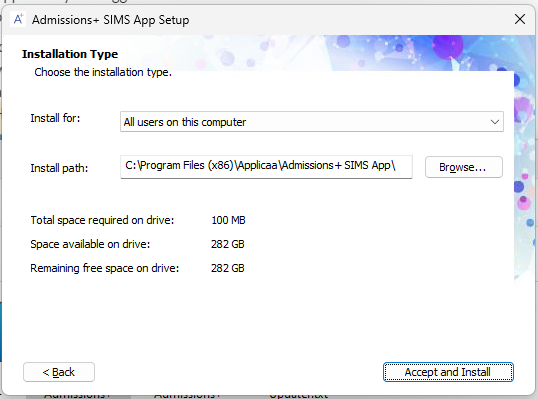
The default installation folder is:
C:\Program Files (x86)\Applicaa\Admissions+ SIMS Appbut you can change it according to your preference.
-
The app size is around 100Mb and it will need extra space for the Settings and Logs under the
\AppData\Roaming\Applicaa\Admissions+ SIMS App
2. What operating system is it compatible with?
- Supported Operating systems: Windows 7 and above
3. What is the licencing agreement?
- The SIMS Application is available with the Applicaa License for Admissions+.
4. What system specifications are required?
- OS: Windows 7 and above
- .NET framework: .NET Framework 4.8
- WebView2 Runtime: https://go.microsoft.com/fwlink/p/?LinkId=2124703
- Recommended Processor: 2 Core / 2.0 GHz and above
- Recommended Memory: 4GB RAM
- Hard Disk: 200MB or above
5. Is there additional software required?
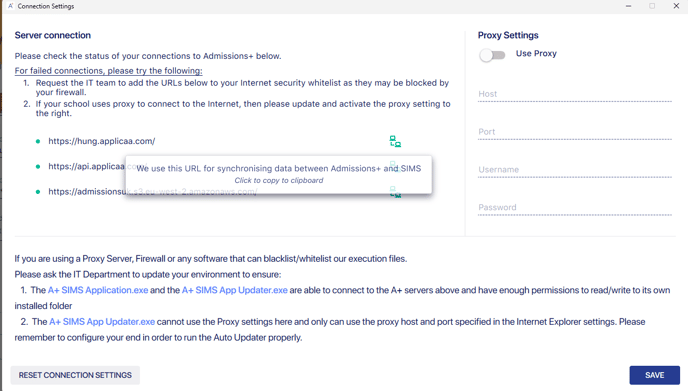
- You will need to whitelist 3 URLs (the app will ask you once you install it - please refer to the screenshot below):
We use this URL for synchronising data between Admissions+ and SIMS
We use this API for checking for updates
https://admissionsuk.s3.eu-west-2.amazonaws.com/
We use this URL for downloading update files from our server
6. How will it be installed?
- Please navigate to this url: https://home.applicaa.com/en-gb/admissions-sims-app and download the installer then install the app
7. Is there any system maintenance required?
- Applicaa issues automatic updates for the application that are installed when the application is launched.
For our Installation Guide Book, please click here.