
How to grant parents permission to view and edit an application form
This article will show you how to add a parental account to allow updating of application form for student
You can grant an additional parent the permission to access and update an application for a student.
To do this, navigate to the profile of the student, click on the Application Form or Admission Form tab then Parent/Carer.
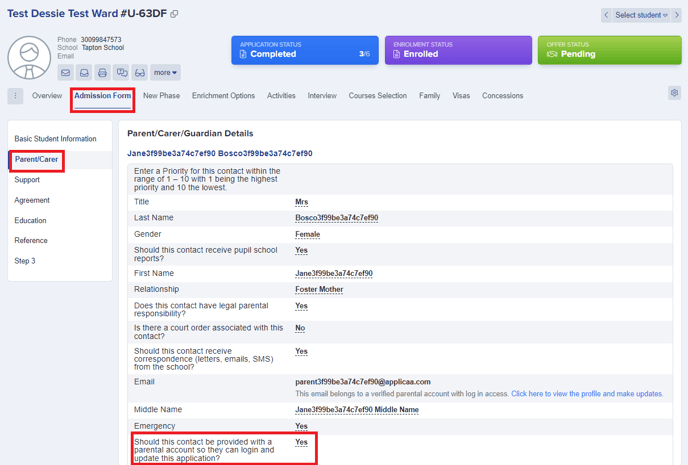

From there locate the parent’s profile information and go to the property ‘Should this contact be provided with a parental account so they can login and update this application?’. Change the answer to “Yes” and then tick to confirm.
Note: If this field isn’t visible on their profile, you may check this via Settings > Application form > Parent Carer.
Under the sections of Parent Carer Contact Details and Additional Contact Basic Details - enable the ‘visible on profile’ button.
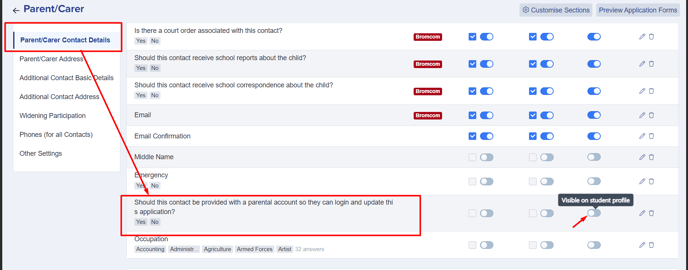
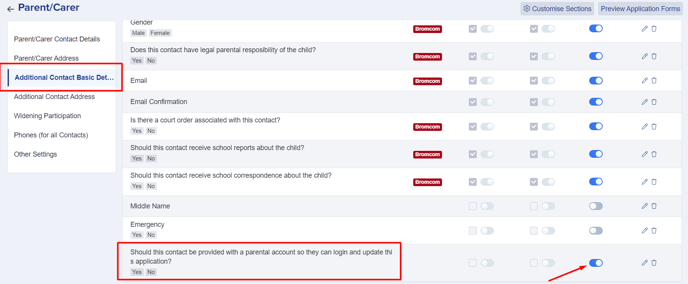
Once activated, you may now go back to their student profile and make the necessary changes.
Once a contact has been given access as described, they will receive an automated email notifying them of their access and providing their login credentials to them.
Was this article helpful?
Thanks for your feedback.