
Arbor MIS Admissions+ API Guide
How to set-up the Arbor API Integration with Admissions+
To connect your Arbor MIS with Admissions+ you will need to:
-
A school admin will need to click this link to go to the Arbor Applicaa App approval page:
https://developers-portal.arbor.sc/integration/authentication/2188
-
Add your Arbor details onto your Admissions+ system:
➡️ Login to Admissions+ and click Settings → School Settings → Integration.
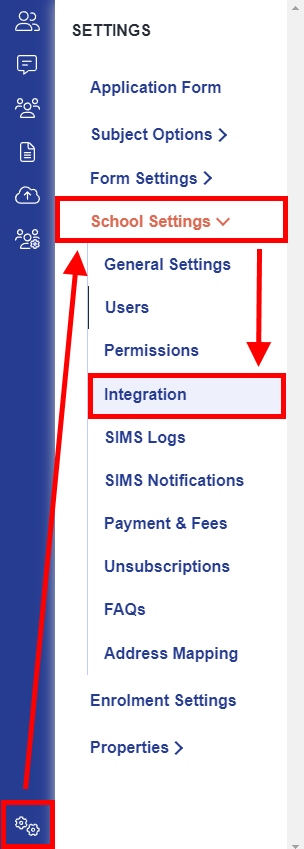
➡️ Click on Edit.

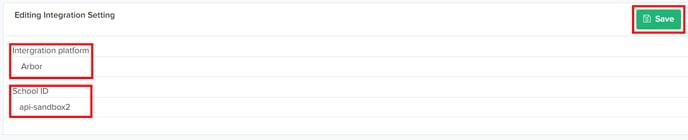
➡️ Select Arbor as the Integration platform then enter your School ID, this is your school name in your Arbor URL as highlighted in bold in the example URL below:
https://schoolname.uk.arbor.sc
-
Click on Save.
-
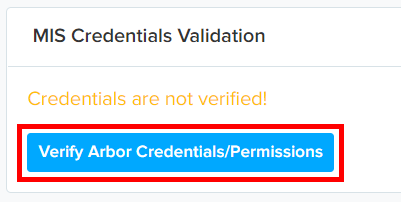
Select Verify Arbor Credentials/Permissions to ensure your MIS credentials are valid.
-
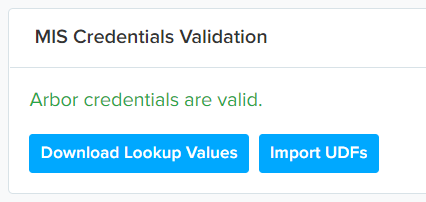
Once the validation process is complete you should see this message.
Was this article helpful?
Thanks for your feedback.